
Instacart Shopper Rewards
Branch MessengerFinance
4.2141.00 Reviews
- Version
- 2026.8.3
- Installs
- 100.00K
- Age Rating
- Everyone
Screenshots
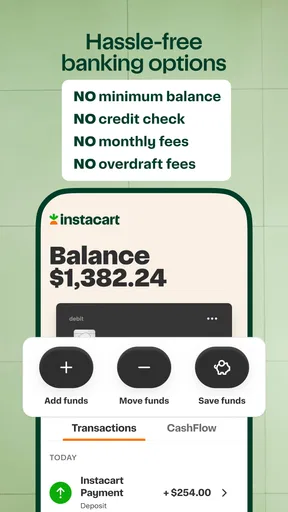
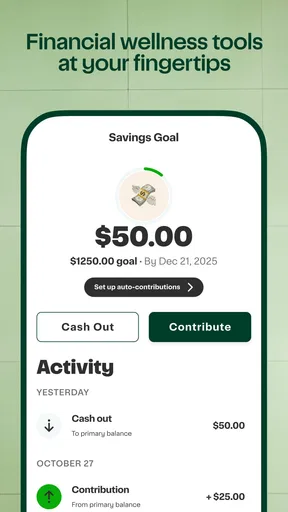
Our Review of Instacart Shopper Rewards
 Analysis by Appyee
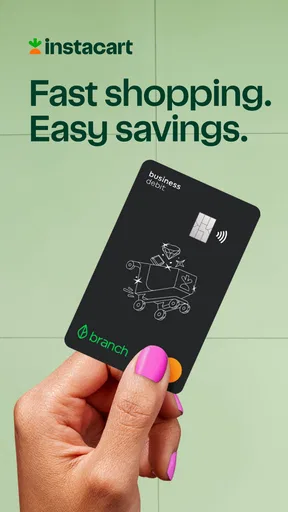
I approached Instacart Shopper Rewards less like a conventional banking app and more like a financial companion built around shopper work. Its store summary points to a new debit card, while the short description identifies it with Instacart Shopper activity. That distinction matters: this is not the kind of finance app I would choose simply because I want a broad budgeting dashboard or a general-purpose bank account. Its appeal is much narrower and more practical for people who earn through shopping and want a dedicated way to handle that part of their money.
After spending time with the app, my main question was not whether it looked polished, but whether it gave me enough control to feel comfortable using a finance product connected to everyday earnings. That is the right way to judge it. A debit card can be convenient, but convenience is only useful when the account setup, personal information, and money movement are understandable. My overall impression is cautiously positive: the app has a clear audience and a focused purpose, but it is best treated as a specialized tool rather than a complete replacement for a traditional bank.
What kind of finance app is this?
The developer is Branch Messenger, and the app is listed as free with an Everyone age rating. It arrived on August 6, 2025, and the current version is 2026.8.3, which tells me this is a relatively recent product rather than a long-established household banking name. It has passed the early discovery stage, with over 100 thousand installs, a 4.2 average from around 552 ratings, and 141 written reviews. Those figures suggest real interest, although I would still read the written feedback carefully before making it the only place I keep my money.
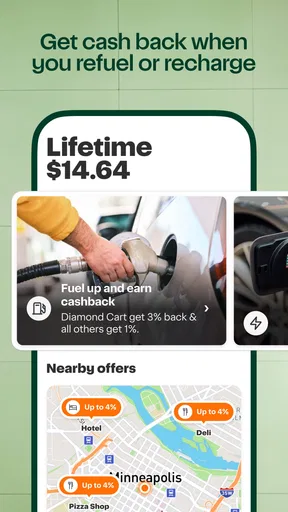
The strongest use case is easy to picture. Imagine finishing a busy shopper shift, receiving earnings connected with that work, and wanting a separate card for fuel, meals, parking, or other costs that happen while you are on the road. A dedicated account can make those expenses easier to see than when everything lands in one personal checking account. I like that separation because it can reduce the mental effort of sorting work-related spending from household bills.
That same focus is also the first limitation. If you want detailed household budgeting, investment tools, shared accounts, extensive bill management, or the broad branch-and-support network associated with a full-service bank, this app may feel too specialized. I would not install it expecting a complete financial command center. I would install it when the shopper connection and debit-card purpose solve a specific problem in my routine.
Why the dedicated-card idea can be useful
A separate card is not automatically better than an existing bank card, but it can create a useful boundary. I can imagine using it only for expenses related to shopping work, then checking that activity without scanning through rent payments, subscriptions, groceries, and personal purchases. That is a small workflow improvement, yet it can make tax preparation conversations, weekly spending reviews, and cash-flow planning less chaotic.
There is another practical advantage to keeping the purpose narrow: I can decide in advance how much money should remain available on the card. Rather than treating every balance as spendable household cash, I can view the account as a working wallet. That mindset is valuable for anyone whose income and expenses change from day to day.
Still, separation creates an extra responsibility. I would need to remember which card is being used, monitor both accounts, and avoid assuming that money available in one place is instantly available in the other. For someone who already struggles to track multiple financial products, adding another account may create more confusion than clarity. In that situation, a familiar checking account with clear transaction labels could be the better choice.
Trust starts with what I can see
Finance apps deserve a higher standard than ordinary utility apps because they combine money with personal information. My trust in this product would depend on the screens shown during account creation, the explanations around the debit card, and the choices presented before I approve anything. I would take time to read each permission request and account notice rather than tapping through setup just to reach the main screen.
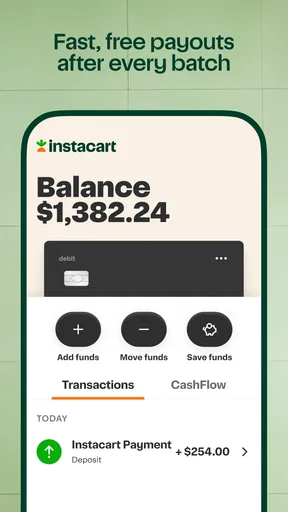
I also look for simple signs of control: whether I can review account activity, recognize where money is going, change contact details without unnecessary friction, and find a clear route for help if something looks wrong. Those are not decorative features. They determine whether I can respond quickly to an unfamiliar transaction or a problem with access.
The app’s finance category and shopper-specific identity make context especially important. I would not assume that a card designed around shopper earnings works exactly like my existing bank card. Before relying on it for fuel or urgent work expenses, I would first learn how the balance is presented, when funds become usable, and what steps the app expects if I lose access. The safest approach is to test the routine with a small amount rather than moving all available money at once.
Account controls I would check first
My first session would be deliberately slow. I would confirm the account name, review the card information, inspect the profile area, and look for security and support options before using the card during a busy shift. I would also enable the strongest sign-in protection the app offers, if available on my device, and keep my phone’s own lock screen active. These habits are more important than the app’s visual design.
I would then make a short personal checklist:
- Confirm which email address or phone number is attached to the account.
- Review every screen that explains how the card and shopper earnings are connected.
- Check where transaction history and account notices appear.
- Learn how to report a card or account problem before one occurs.
- Keep a backup payment method for fuel and essential work expenses.
This is one of the less obvious trade-offs of a specialized finance app. The more useful it becomes in a particular work routine, the more disruptive a login, card, or account issue can be. I would never make it my only way to pay for a shift until I had tested it under ordinary conditions and understood the recovery path.
Where privacy deserves attention
The most sensitive moments are not limited to the first download. They include identity and account setup, linking work-related activity, viewing balances in public, handling a lost phone, and contacting support about a transaction. At each point, I would pause and ask what information is being requested, why it is needed, and whether the choice is clearly explained.
I do not treat a free price as proof that a finance app has no cost in other ways. Free to install is useful, but it does not answer every question I have about account terms, card usage, transfers, or data handling. I would read the in-app disclosures and account notices before committing to a regular workflow. That is not suspicion for its own sake; it is normal caution when an app sits close to my income.
I would also avoid using the app on a shared or unsecured device. A shopper may check the account in a car, at a pickup location, or during a break, but convenience should not mean leaving the session open where another person can see it. I would lock the phone after checking the balance and avoid discussing account details in public support conversations.
One useful habit is to review activity at a fixed time rather than only when something feels wrong. For example, after finishing work, I could compare the card activity with my own notes about fuel and other expenses. This creates a simple personal record and makes unfamiliar entries easier to notice. It also prevents the app from becoming a black box that I open only when I need money.
How much control does the user really have?
User agency, in my view, means more than having a debit card. It means understanding what I am agreeing to, being able to make deliberate choices, and having a practical response when something changes. I would look for clear confirmation before important actions, readable transaction details, and account settings that do not hide basic controls behind vague labels.
The best way to preserve that agency is to establish boundaries before using the app. I would decide what the card is for, how often I will review it, and what amount I am comfortable keeping there. If I use it for work expenses, I would record those expenses separately instead of assuming the app alone will organize my finances in the way I need.
I would also keep my primary bank account active. That gives me a fallback for bills and purchases if the shopper-focused account is unavailable, if my phone is lost, or if I need a payment method accepted by a merchant that does not work with the card. This is not a criticism unique to this product; it is a sensible rule for any newer financial service that becomes part of a daily routine.
Another important question is who should skip it. I would hesitate if I wanted a joint household account, a mature budgeting system, a broad range of financial products, or one place for every personal and work transaction. I would also skip it if I was uncomfortable reading account terms or maintaining a backup payment method. A focused product rewards focused use; it is less convincing when forced to perform the job of a full bank.
How it compares with the usual alternatives
Compared with using a normal checking account, this app’s likely advantage is purpose. A conventional account may offer a wider set of services and a longer history, but it can mix shopper-related spending with everything else. The dedicated-card approach may make work activity easier to isolate, especially for someone who wants a separate spending boundary.
Compared with a general prepaid or digital wallet product, the shopper identity is the important difference. A generic wallet may be more flexible for everyday payments, while this app is more relevant when the user’s financial routine is tied to Instacart Shopper work. I would choose the general alternative if I needed broad personal use and did not care about that connection.
Compared with a traditional bank, I would expect to do more of my own checking around support, account recovery, and everyday availability. A bank may be preferable for someone who values in-person assistance or wants a long-established all-purpose relationship. On the other hand, a shopper who wants a focused card and prefers managing money from a phone may find the narrower design easier to understand.
The comparison should not be reduced to which app has more features. Extra features can create clutter, while a specialized account can be useful precisely because it does less. My decision would come down to whether the shopper workflow saves me enough time and confusion to justify maintaining another financial account.
A realistic routine I would recommend
Suppose I am working several shopping blocks in one week. I would begin by checking the account before leaving, not while rushing into a pickup. During the day, I would use the card only for the expenses I have assigned to it. At the end of the shift, I would review the activity, note anything unfamiliar, and compare the remaining balance with my own spending record.
At the end of the week, I would decide whether the separation is helping. Are work expenses easier to identify? Do I understand the balance without opening several other apps? Have I needed my backup card because of a limitation or access problem? These questions are more useful than judging the app after one quick login.
A second non-obvious tip is to avoid treating the displayed balance as a complete financial plan. A balance can look healthy while upcoming personal bills are waiting elsewhere, or it can look low even though more shopper-related money is expected later. I would use this app as one part of a cash-flow routine, not as a substitute for looking at my broader finances.
A third is to prepare for interruptions before they happen. I would store support information safely, keep the phone number or email used for the account current, and maintain another way to pay for a time-sensitive work expense. That preparation takes little effort and protects the very convenience the app is meant to provide.
My cautious verdict
My recommendation is conditional rather than universal: Instacart Shopper Rewards makes the most sense for an Instacart Shopper who wants a dedicated debit-card experience around shopper-related money and is comfortable managing a specialized finance account. The free installation and focused purpose make it easy to try, while the Everyone rating keeps the product broadly accessible from an age-classification standpoint.
I would not recommend moving all personal finances into it immediately. I would start with a limited role, read every account and privacy notice, test the controls, and keep a backup payment method. The 4.2 average and growing install base are encouraging signs of interest, but they do not replace my own checks around access, transaction visibility, and support.
In the end, I see this as a practical companion for a specific working pattern, not a universal banking answer. If separating shopper activity from household spending would make your week easier, it is worth examining. If you need a complete bank, shared money management, or the widest possible financial toolkit, I would choose a more established all-purpose alternative. The right reason to use it is control through focus, not the promise of replacing every other account.
Verdict
Strengths of Instacart Shopper Rewards
- Rewards can add extra value to eligible shopping and delivery activity.
- Offers may help frequent shoppers reduce everyday business expenses.
- The program is integrated with the shopper experience for easy access.
- Reward details can be reviewed before deciding whether an offer is worthwhile.
- Useful for shoppers who regularly complete orders in participating areas.
Limitations of Instacart Shopper Rewards
- Eligibility and available benefits may vary by location and shopper status.
- Rewards can change or expire, making long-term planning difficult.
- Some benefits may require meeting specific order or activity conditions.
- Not every purchase or expense is guaranteed to qualify for rewards.
- The program may be less useful for occasional or low-volume shoppers.
Other Releases by Branch Messenger
View All
Uber Pro Card
Finance4.9
Similar Picks in This Category
View All
Google Wallet
Google LLC4.3

Airtel: Recharge, Bank & Loans
Airtel4.0

PayPal - Pay, Send, Save
PayPal Mobile4.2

DANA Indonesia Digital Wallet
PT Espay Debit Indonesia Koe4.5

Binance: Buy Bitcoin & Crypto
Binance Inc.4.8

Cash App
Block, Inc.4.7
Frequently Asked Questions
What is Instacart Shopper Rewards?
Instacart Shopper Rewards is a program designed for eligible Instacart shoppers, offering benefits or incentives based on shopping and delivery activity. Depending on your location and current program terms, rewards may include points, discounts, cash-back opportunities, or other perks. Availability and exact benefits can change, so shoppers should review the details shown in the official Instacart Shopper app before relying on the program.
Who can participate in Instacart Shopper Rewards?
Eligibility generally depends on factors such as your shopper account status, location, activity, and the specific promotion or rewards offer available at the time. Not every shopper will see the same benefits, and some offers may be invitation-only or limited to certain markets. After installing or opening the official shopper app, check the Rewards section and read the applicable terms carefully.
How do I earn and redeem rewards?
The process depends on the particular Instacart Shopper Rewards offer. Some rewards may be earned by completing qualifying batches, meeting activity requirements, or using an eligible payment method, while others may be issued automatically after a promotion ends. Redemption instructions, expiration dates, minimum thresholds, and restrictions should appear in the app. Always confirm these details before making extra trips solely to earn a reward.
Does Instacart Shopper Rewards cost anything to use?
Accessing a rewards section or viewing available offers typically does not require a separate download fee, but individual benefits may have conditions, exclusions, or costs attached. For example, a reward could require qualifying purchases, a specific payment method, or continued eligibility as a shopper. Avoid third-party websites promising guaranteed rewards, and rely on the official Instacart app and published terms for accurate information.
Is Instacart Shopper Rewards available everywhere, and is it safe?
Availability can vary by country, state, city, account type, and promotional period, so the program may not appear for every Instacart shopper. The safest way to access it is through the official Instacart Shopper application downloaded from Google Play or the Apple App Store. Keep the app updated, protect your login details, and be cautious of messages requesting passwords, payment information, or verification codes.
